
Thank you very much for purchasing my Pixinsight Image Processing guide.
The images I used in the workflows throughout this guide are available to download below.
These can be used to follow the workflows in the guide if needed.
I have also started to put some extra useful hints and tips and any errors made in the book at the bottom of this page.
Please let me know how you get on.
A few of the files and images are bundled into Zipped Files.
These can be downloaded by right-clicking the links in the titles below and saving the file from the menu.
Security built into some Web Browsers, such as Chrome, may restrict downloading Zip files.
If that is the case, please try downloading them using a different Browser.
Process Icons.
Process-Icons.xpsm
This is the set of process Icons I have set up in my PixInsight Project.
You will be able to remove or add and save your own Process Icons as required.
You will need to use a right-hand click to download this.
Heart Nebula Images.
IC1805-Heart-Nebula-One-Shot-Colour.zip
All the Heart Nebula images for integration and processing.
The URL for FLO’s Spanish remote observatory data.
https://www.remoteobservatory.com/data-release
You can download the Eagle Nebula and Iris Nebula data and a few more images from the link above.
Colour 12P Comet Images.
Comet-12P-Colour-2600MC.zip
The colour comet data shown processed between pages 85 & 92 to produce an image with trailed stars.
Monochrome Comet 12P Images.
Comet-12P-Monochrome-533MM.zip
The monochrome comet data shown processed between pages 93 & 99 to produce an image with untrailed stars.
Both the colour and monochrome comet data can be used for either of the above processes.
Monochrome C/2023 A3 Image.
Comet-C2023A3-20241017.tif
The monochrome image that is processed on pages 100 & 101 using the Larson-Sekanina Comet Filter.
This will also be a good image to try SetiAstro’s Belmish Blaster Satellite removal Script.
Sun, Moon & Planet Images.
Sun-Moon-Planets.zip
The Solar, Lunar and Planet images shown between pages 102 and 105.
Comet 12P & Galaxy Images.
Galaxy-Comet-C2022-E3-Images.zip
The images processed on pages 115 & 116 that I used to isolate a galaxy from a comet image and re-merge it into the background stars.
Useful bits.
Blink Video Creation.
For Blink to create a video from the frames loaded, ffmpeg.exe needs to be downloaded and installed.
This can be downloaded from here:
https://www.ffmpeg.org/download.html
Copy only the extracted ffmpeg.exe file into the folder: C:\Program Files\PixInsight\bin
Blink will then run and be able to create a video.
If you do not want the individual frames to be saved, tick the Delete Video frames box.
Resources URL’s.
Below is the list of resources shown in my guide. To install them in your copy of PixInsight, you can copy and paste them into your Resource panel.
I’ll add more useful resource URL’s underneath this list as I find them.
https://www.rc-astro.com/BlurXTerminator/PixInsight
https://www.rc-astro.com/StarXTerminator/PixInsight
https://www.rc-astro.com/NoiseXTerminator/PixInsight
https://www.cosmicphotons.com/pi-modules/narrowbandnormalization/
https://www.ghsastro.co.uk/updates/
https://elveteek.ch/pixinsight-updates/ez-processing-suite/
https://www.skypixels.at/HVB_Repository/
https://www.cosmicphotons.com/pi-scripts/screenstars/
https://www.cosmicphotons.com/pi-scripts/imageblend/
https://www.cosmicphotons.com/pi-modules/solartoolbox/
https://www.rc-astro.com/TensorFlow/PixInsight/GPU/
https://raw.githubusercontent.com/setiastro/cosmicclarity/main/
https://www.ideviceapps.de/PixInsight/Utilities/
https://www.cosmicphotons.com/pi-scripts/pixelmathui/
https://www.cosmicphotons.com/pi-scripts/drawannotation/
https://raw.githubusercontent.com/killerciao/VeraLuxPorting/main/
Multiscale Adaptive Stretch (MAS) looks like it will be a very useful tool:
https://pixinsight.net/dev/index.php?ams/multiscaleadaptivestretch-version-1-1-released.11
https://pixinsight.net/dev/index.php?ams/the-multiscaleadaptivestretch-tool.6
Foraxx Palette may have been removed: https://foraxxpaletteutility.com/FPU/
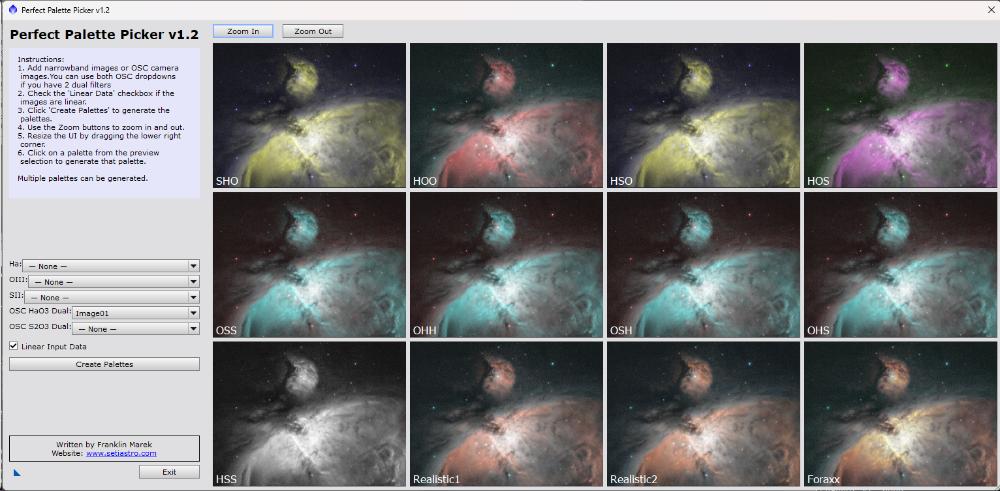
However, use Seti Astro’s excellent Perfect Palette Picker to do Foraxx and 11 other types of palettes.
It works so well on separate mono HOS as well as one-shot colour images, as shown below.
The URL to add, if you haven’t already, is:
https://raw.githubusercontent.com/setiastro/pixinsight-updates/main/
Notes.
A few people have E-Mailed me asking why I have not included any calibration frames with the data I have made available.
There are a few reasons for that.
1. It makes it quicker and a lot easier for beginners to process images.
2. I did not capture any calibration frames for this camera at the time.
3. To prove a point, especially to beginners starting to process images, that calibration frames aren’t always necessary to produce a reasonable image. When taken carefully, calibration frames can help tidy up an image, but bad or poorly applied calibration frames can ruin an image.
You’ll still get a decent image without calibration frames if your data is good.
Once you’ve mastered the basics of processing, you can start taking and applying proper calibration frames to further improve your images.
Errata
Thank you to those who pointed out a couple of mistakes I made in my first print run.
Page 40, line 2 should read:
“If Noise Xterminator is not installed, go to Noise Removal Below.”
Page 44, line 1 should read:
“The left-hand side of the line needs to be raised slightly, and the right-hand side needs to be moved down.”